
Pre-migration assessment
A read-only scan of every site produces Storage Assessment and Permission Matrix reports in Excel, plus the issues to fix before moving to the target you chose.
SPMovegrator takes SharePoint 2010, 2013, 2016 and 2019 to a newer, better platform — SharePoint Subscription Edition or SharePoint Online. Documents, list items, permissions and full version history move across, with original dates and authors kept, and every run is validated automatically.
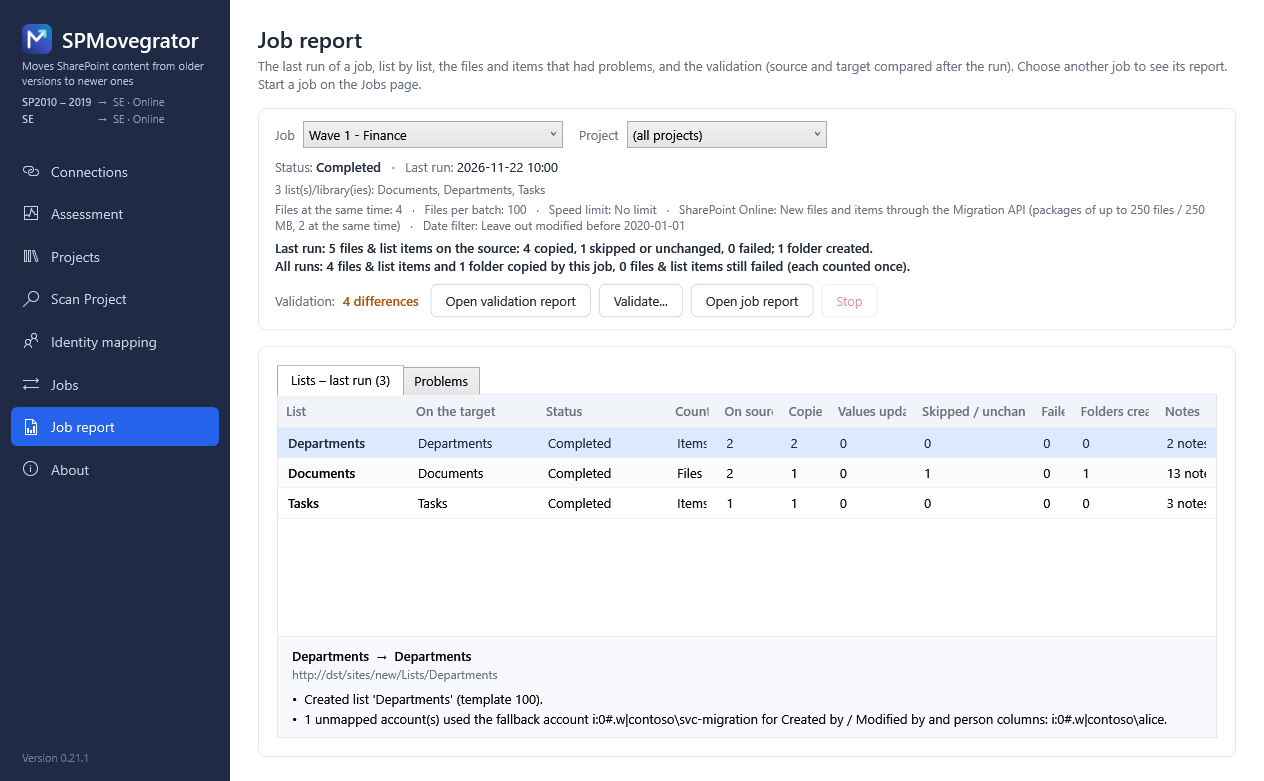
Move it by hand or through Explorer view and you lose the history that makes your organization's data trustworthy.
A read-only scan of every site produces Storage Assessment and Permission Matrix reports in Excel, plus the issues to fix before moving to the target you chose.
The scan measures network and server speed, then estimates how long the whole project will take — current versions only, or all versions.
Users and groups are matched on the target by UPN, e-mail or username — across domains too. Review in bulk through Excel export / import, and set a fallback account.
Lists, libraries, folders, files with versions, list items, attachments, columns, views, lookups and Tag Metadata.
Unique permissions of sub-sites, lists, folders, files and items, with SharePoint groups and permission levels recreated on the target from your identity mapping.
Run again to copy only what changed. Renames and moves are followed, deletions can mirror the source, and edits made on the target are never overwritten — ideal for multi-pass cut-overs.
New files and items go to SharePoint Online in batches through the SharePoint Migration API. Run several jobs at once, cap the speed, pause and resume.
Both sides are read again (read-only) to compare counts, sizes, versions, dates, people, column values, attachments, permissions and file contents — real differences kept apart from expected ones.
Pick a list in any sub-site and the matching sub-site is created on the target with its original template, with permissions copied at every level.
Every step is an easy Windows screen — no PowerShell scripting
Add SharePoint On-premises connections (Windows, Forms, ADFS/SAML) and SharePoint Online with a browser sign-in that supports MFA — a Site Collection Admin account is all you need, no Global Admin rights.
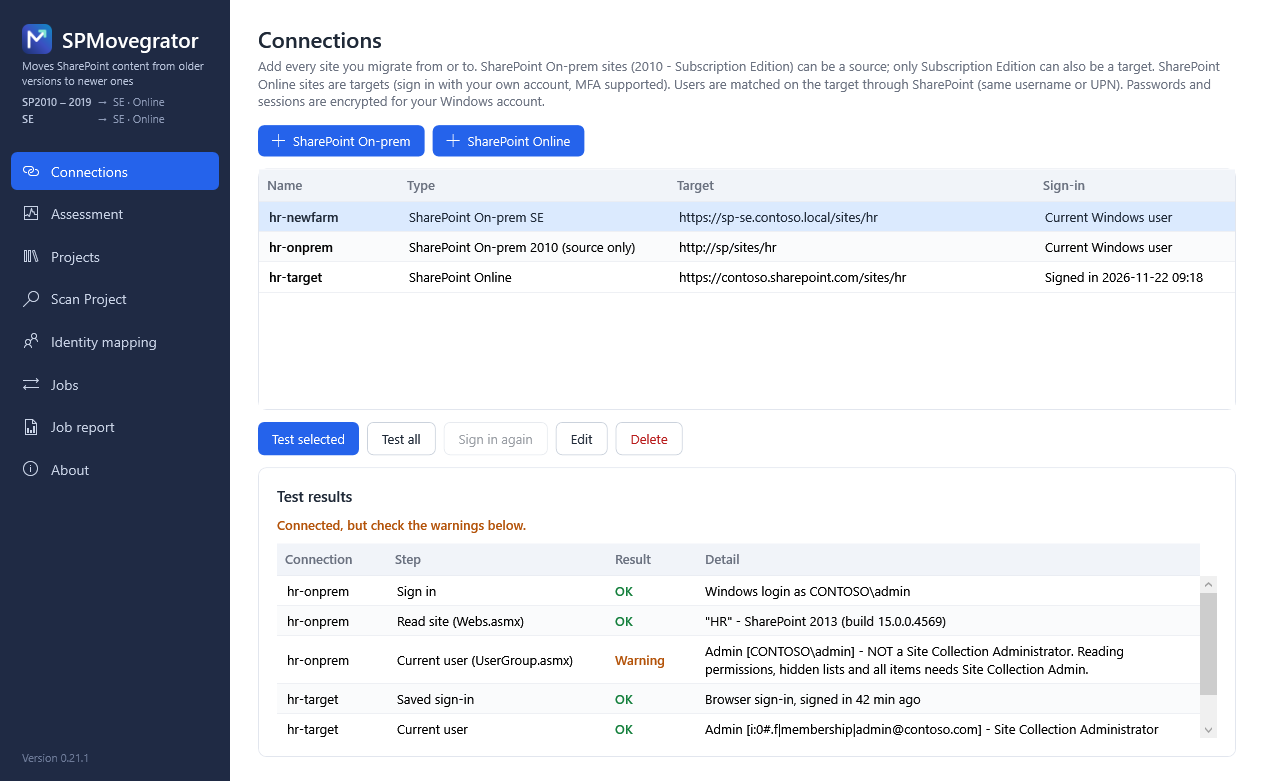
Not just files — the structure and history that keep your data trustworthy after the move.
We are upfront about limits: SharePoint 2010 does not expose item-level permissions through its API, so the app always flags them in the report. Site, list and folder permissions move as usual.
SharePoint 2010 – 2019 have reached the end of Microsoft Extended Support (2016 and 2019 ended on 14 July 2026). Choose the target that fits your organization and let SPMovegrator bring everything across.
The latest on-premises release, in your own data center
Microsoft 365 — no more servers to maintain
SPMovegrator is a Windows app that runs on your own machine. Data flows straight from the source SharePoint to the target.
Documents and user lists never pass through a vendor cloud. Works even on closed networks.
Saved sign-in sessions are encrypted with Windows DPAPI and bound to your Windows user.
Sign in through the real Microsoft sign-in page without turning MFA off. App Registration is supported for organizations that need it.
Scans and validation never write to the source SharePoint, so production stays safe.
Every job keeps a per-file, per-item report and its validation report — ready as hand-over evidence.
A checkpoint for every item means re-runs never create duplicates — built for hundreds of thousands of items.
Move the intranet and department documents to Microsoft 365 yourselves, without outsourcing the whole project.
Assess before you quote, estimate the migration time, and hand over the validation report as a deliverable.
Move across farms and domains, mapping accounts so Created by / Modified by stay correct.
Free migration tools are fine for a simple move to the cloud. SPMovegrator is for upgrades to SharePoint SE, cross-domain moves and projects that need proof the move is complete.เครื่องมือฟรีเหมาะกับการย้ายขึ้น cloud แบบง่ายๆ ส่วน SPMovegrator เหมาะกับการอัปเกรดเป็น SharePoint SE การย้ายข้ามโดเมน และงานที่ต้องมีหลักฐานว่าย้ายครบ
One price, every feature. Pay online and receive your license key by e-mail.
Perpetual use on 1 computer
Secure online payment · Price in US dollars (USD)
By purchasing, you agree to the Terms of Service, including the refund policy and disclaimer.
Document libraries and custom lists with their folders, files and list items — every version included — along with attachments, columns, views and versioning settings, lookups, Managed Metadata and term sets, and person columns. Created, Modified, Created by and Modified by stay as on the source. Sub-sites are created with their templates, and unique permissions, SharePoint groups and permission levels can be migrated too.Document library และ custom list พร้อม folder ไฟล์ และรายการใน list ครบทุก version รวมถึงไฟล์แนบ คอลัมน์ view การตั้งค่า versioning, Lookup, Managed Metadata และ term set และคอลัมน์คน โดยคง Created, Modified, Created by และ Modified by ไว้ตามต้นทาง สร้าง sub-site ให้ตาม template เดิม และย้ายสิทธิ์เฉพาะ (unique permission), SharePoint group และ permission level ได้ด้วย
SPMovegrator focuses on your content and its structure, not on site design. The look and home page of the root site or site collection — templates, master pages, themes and other customizations — are not moved. This keeps your new site clean and lets it follow the modern design of the new SharePoint.SPMovegrator เน้นย้ายเนื้อหาและโครงสร้างของข้อมูล ไม่ได้ย้ายงานออกแบบของ site ดังนั้นรูปแบบและหน้าแรกของ root site หรือ site collection เช่น template, master page, theme และการปรับแต่งหน้าตาต่างๆ จะไม่ถูกย้ายไป ทำให้ site ใหม่สะอาด และใช้รูปแบบที่ทันสมัยของ SharePoint รุ่นใหม่ได้เต็มที่
No. SPMovegrator recreates everything under the site collection for you — sub-sites, libraries, lists and folders. If a sub-site, library or folder with the same name already exists on the target, your data is moved into it and permissions are applied according to your job options, while documents that are already there are left untouched.ไม่ต้อง SPMovegrator สร้างโครงสร้างทั้งหมดภายใต้ site collection ให้เอง ตั้งแต่ sub-site, library, list ไปจนถึง folder หากปลายทางมี sub-site, library หรือ folder ชื่อเดียวกันอยู่แล้ว โปรแกรมจะย้ายข้อมูลเข้าไปและกำหนดสิทธิ์ตามตัวเลือกของ job โดยไม่แก้ไขเอกสารที่มีอยู่เดิมที่ปลายทาง
Avoid creating libraries, lists, folders, list items or documents on the target with the same names as the source content you are about to migrate. Matching names can confuse your users, and content may be treated as the same item and overwritten during the move. Let SPMovegrator create the structure, and add new content on the target after the migration.ไม่ควรสร้าง library, list, folder, รายการ หรือเอกสารที่ปลายทาง โดยใช้ชื่อเดียวกับข้อมูลต้นทางที่รอย้าย เพราะชื่อที่ซ้ำกันอาจทำให้ผู้ใช้งานสับสน และข้อมูลอาจถูกมองว่าเป็นรายการเดียวกันจนถูกเขียนทับระหว่างการย้าย แนะนำให้ปล่อยให้ SPMovegrator สร้างโครงสร้างให้ แล้วค่อยเพิ่มข้อมูลใหม่ที่ปลายทางหลังย้ายเสร็จ
For SharePoint Online, a Site Collection Admin account on the target site is enough — sign in through the browser with MFA. Global Admin is not required, and App Registration is supported for organizations that need it.
No. SPMovegrator installs on any Windows computer that can reach both the source and the target SharePoint, and connects through SharePoint's standard APIs.
Yes. Run the first pass while people work as usual, then run incremental passes to copy only what changed before cut-over day, keeping downtime as short as possible. However, we recommend setting a cut-off time, so data stops changing and validation stays straightforward.
Set a fallback account in the project. Content from users that cannot be matched is attributed to the fallback account, and the reports list every one of them for review.
When a job finishes, the app validates automatically: it reads both sides and compares counts, sizes, versions, dates, people, column values, attachments and permissions, producing an Excel report that separates real differences from those caused by your job options.
64-bit Windows 10/11 or Windows Server with Microsoft Edge WebView2 (already included in recent Windows). The installer bundles every runtime it needs.
Your license key — perpetual use on 1 computer, with no yearly fee.
Download it from the free 15-day trial button on this page. There is only one installer: when you buy a license, just enter your key in the app you already installed and it becomes the full version — no reinstall needed.ดาวน์โหลดได้จากปุ่มทดลองใช้ฟรี 15 วันบนหน้านี้ ตัวติดตั้งมีเพียงตัวเดียว เมื่อซื้อ license แล้ว เพียงใส่ key ในโปรแกรมที่ติดตั้งไว้ ก็กลายเป็นเวอร์ชันเต็มได้ทันที ไม่ต้องติดตั้งใหม่
No. After you first activate your key, there is a short verification period. During that period the app may need to check your license online, so please keep the computer connected to the internet. Once the period has passed, the app works fully offline.ไม่จำเป็น หลัง activate key ครั้งแรก จะมีช่วงตรวจสอบ license ระยะหนึ่ง ระหว่างช่วงนี้โปรแกรมอาจต้องตรวจสอบ license ผ่านอินเทอร์เน็ต กรุณาเชื่อมต่ออินเทอร์เน็ตไว้ เมื่อพ้นช่วงนี้แล้ว ก็ใช้งานแบบ offline ได้เต็มรูปแบบ
Start with an assessment today and plan your migration with confidence.